withdrawal.jsp
<%@ page language="java" contentType="text/html; charset=UTF-8" pageEncoding="UTF-8"%>

<!-- header.jsp -->
<%@ include file="/WEB-INF/view/layout/header.jsp"%>

<!-- start of content.jsp(xxx.jsp) -->
<div class="col-sm-8">
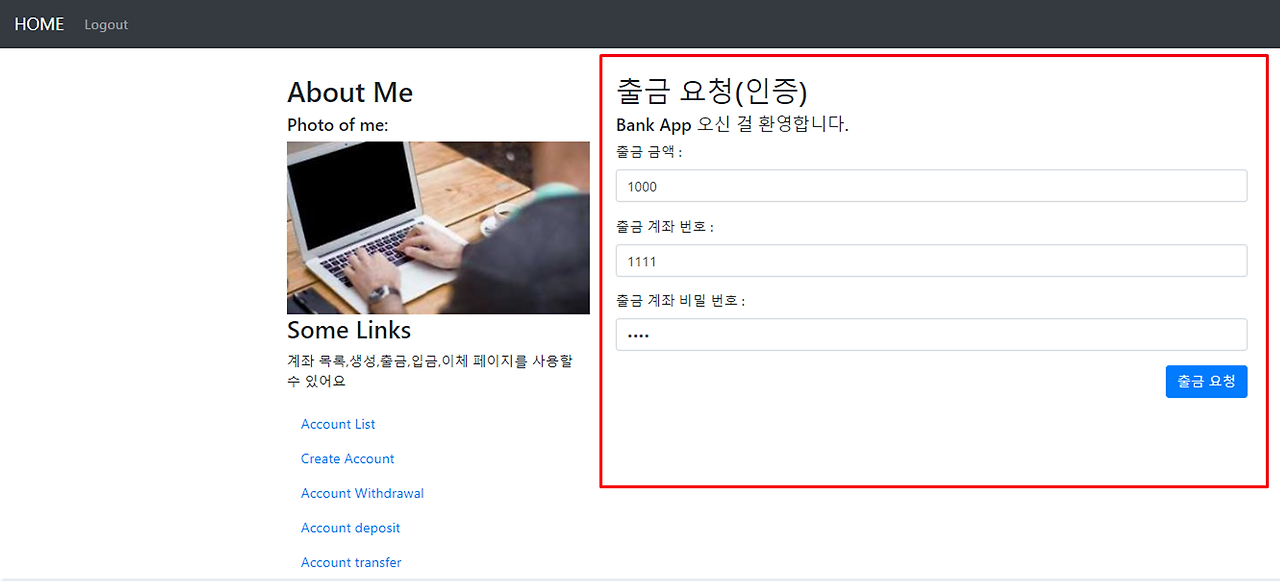
	<h2>출금요청(인증)</h2>
	<h5>Bank App에 오신걸 환영합니다.</h5>
	<!-- 자원의 요청은 get 방식을 이용하지만 -->
	<!-- 로그인 페이지는 보안처리 때문에 예외적으로 post방식으로 던지는 것이 좋다. -->
	<!--
	insert into account_tb(number, password, balance, user_id, created_at)
	 -->
	<form action="/account/withdrawal"  method="post">
		<div class="form-group">
			<label for="amount">출금 금액:</label>
			<input type="number" class="form-control" placeholder="Enter amount" id="amount" name="amount" value="1000">
		</div>
		<div class="form-group">
			<label for="wAccountNumber">출금 계좌 번호:</label>
			<input type="text" class="form-control" placeholder="Enter account number" id="wAccountNumber" name="wAccountNumber" value="1111">
		</div>
		<div class="form-group">
			<label for="pwd">출금 계좌 비밀번호:</label>
			<input type="password" class="form-control" placeholder="Enter password" id="pwd" name="wAccountPassword" value="1234">
		</div>
		<div class="text-right">
		<button type="submit" class="btn btn-primary">출금 요청</button>
		</div>
	</form>
</div>
<!-- end of col-sm-8 -->
</div>
</div>
<!-- end of content.jsp(xxx.jsp) -->

<!-- footer.jsp -->
<%@ include file="/WEB-INF/view/layout/footer.jsp"%>
결과 화면 확인
WithdrawalDTO
package com.tenco.bank.dto;

import lombok.AllArgsConstructor;
import lombok.Builder;
import lombok.Data;
import lombok.NoArgsConstructor;
import lombok.ToString;

@Data
@NoArgsConstructor
@AllArgsConstructor
@Builder
@ToString
public class WithdrawalDTO {

	private Long amount;
	private String wAccountNumber;
	private String wAccountPassword;

}
AccountController
package com.tenco.bank.controller;

import java.util.List;

import org.springframework.beans.factory.annotation.Autowired;
import org.springframework.http.HttpStatus;
import org.springframework.stereotype.Controller;
import org.springframework.ui.Model;
import org.springframework.web.bind.annotation.GetMapping;
import org.springframework.web.bind.annotation.PostMapping;
import org.springframework.web.bind.annotation.RequestMapping;

import com.tenco.bank.dto.SaveDTO;
import com.tenco.bank.dto.WithdrawalDTO;
import com.tenco.bank.handler.exception.DataDeliveryException;
import com.tenco.bank.handler.exception.UnAuthorizedException;
import com.tenco.bank.repository.model.Account;
import com.tenco.bank.repository.model.User;
import com.tenco.bank.service.AccountService;
import com.tenco.bank.utils.Define;

import jakarta.servlet.http.HttpSession;

@Controller // IoC대상 (싱글톤으로 관리)
@RequestMapping("/account") // 대문열기
public class AccountController {

	// 계좌 생성 화면 요청 - DI 처리
	private final HttpSession session;
	private final AccountService accountService; // 멤버변수 선언 시 final 사용하면 성능적으로 더 낫다.

	// @Autowired
	public AccountController(HttpSession session, AccountService accountService) {
		this.session = session;
		this.accountService = accountService;
	}

	/**
	 * 계좌 생성 페이지 요청 주소설계 - http://localhost:8080/account/save
	 *
	 * @return save.jsp
	 */
	@GetMapping("/save")
	public String savePage() {

		// 1. 인증 검사 필요(account 전체가 필요하다.)
		User principal = (User) session.getAttribute(Define.PRINCIPAL);
		if (principal == null) { // 로그인 하지 않았다면
			throw new UnAuthorizedException(Define.NOT_AN_AUTHENTICATED_USER, HttpStatus.UNAUTHORIZED);
		}
		return "account/save";
	}

	/**
	 * 계좌 생성 기능 요청 주소설계 - http://localhost:8080/account/save
	 *
	 * @return : 추후 계좌 목록 페이지로 이동 처리
	 */
	@PostMapping("/save")
	public String saveProc(SaveDTO dto) {
		// 1. form 데이터 추출 (파싱 전략)
		// 2. 인증 검사
		User principal = (User) session.getAttribute(Define.PRINCIPAL);
		if (principal == null) { // 로그인 하지 않았다면
			throw new UnAuthorizedException(Define.NOT_AN_AUTHENTICATED_USER, HttpStatus.UNAUTHORIZED);
		}

		// 3. 유효성 검사
		if (dto.getNumber() == null || dto.getNumber().isEmpty()) {
			throw new DataDeliveryException(Define.ENTER_YOUR_ACCOUNT_NUMBER, HttpStatus.BAD_REQUEST);
		}

		if (dto.getPassword() == null || dto.getPassword().isEmpty()) {
			throw new DataDeliveryException(Define.ENTER_YOUR_PASSWORD, HttpStatus.BAD_REQUEST);
		}

		if (dto.getBalance() == null || dto.getBalance() <= 0) {
			throw new DataDeliveryException(Define.ENTER_YOUR_BALANCE, HttpStatus.BAD_REQUEST);
		}

		// 4. 서비스 호출
		accountService.createAccount(dto, principal.getId());

		return "redirect:/index";
	}

	/**
	 * 계좌 목록 페이지 요청 주소설계 - http://localhost:8080/account/list , ..../
	 *
	 * @return
	 */
	@GetMapping({ "/list", "/" }) // url 매핑을 두 개 설정 가능하다.
	public String listPage(Model model) { // TODO - 검색 기능 + 페이징 처리 추가 가능

		// 1. 인증검사
		User principal = (User) session.getAttribute(Define.PRINCIPAL);
		if (principal == null) {
			throw new UnAuthorizedException(Define.NOT_AN_AUTHENTICATED_USER, HttpStatus.UNAUTHORIZED);
		}

		// 2. 유효성 검사 - 추출할 데이터 없으므로 아직 필요 x

		// 3. 서비스 호출
		List<Account> accountList = accountService.readAccountListByUserId(principal.getId());
		if (accountList.isEmpty()) { // 리스트는 있으나, 값이 비어있는 경우
			model.addAttribute("accountList", null); // 값은 null
		} else {
			model.addAttribute("accountList", accountList);
		}
		// JSP에 데이터를 넣어주는 기술 - set/getAttribute
		return "account/list";
	}

	/**
	 * 출금 페이지 요청
	 *
	 * @return withdrawal.jsp
	 */
	@GetMapping("/withdrawal")
	public String withdrawalPage() {

		// 1. 인증검사
		User principal = (User) session.getAttribute(Define.PRINCIPAL);
		if (principal == null) {
			throw new UnAuthorizedException(Define.NOT_AN_AUTHENTICATED_USER, HttpStatus.UNAUTHORIZED);
		}
		return "account/withdrawal";
	}

	@PostMapping("/withdrawal")
	public String withdrawalProc(WithdrawalDTO dto) {

		// 1. 인증검사
		User principal = (User) session.getAttribute(Define.PRINCIPAL);
		if (principal == null) {
			throw new UnAuthorizedException(Define.NOT_AN_AUTHENTICATED_USER, HttpStatus.UNAUTHORIZED);
		}

		// 유효성 검사 (직접 자바 코드를 통해 개발했었지만) -> 스프링부트에서 제공하는 유효성 검사 라이브러리 @Valid 존재
		if(dto.getAmount() == null) {
			throw new DataDeliveryException(Define.ENTER_YOUR_BALANCE, HttpStatus.BAD_REQUEST);
		}

		if(dto.getAmount().longValue() <= 0) {
			throw new DataDeliveryException(Define.W_BALANCE_VALUE, HttpStatus.BAD_REQUEST);
		}

		if(dto.getWAccountNumber() == null) {
			throw new DataDeliveryException(Define.ENTER_YOUR_ACCOUNT_NUMBER, HttpStatus.BAD_REQUEST);
		}

		if(dto.getWAccountPassword() == null || dto.getWAccountPassword().isEmpty()) {
			throw new DataDeliveryException(Define.ENTER_YOUR_PASSWORD, HttpStatus.BAD_REQUEST);
		}

		accountService.updateAccountWithdraw(dto, principal.getId());

		return "redirect:/account/list";
	}

}
AccountService
package com.tenco.bank.service;

import java.util.List;

import org.springframework.beans.factory.annotation.Autowired;
import org.springframework.dao.DataAccessException;
import org.springframework.http.HttpStatus;
import org.springframework.stereotype.Service;
import org.springframework.transaction.annotation.Transactional;

import com.tenco.bank.dto.SaveDTO;
import com.tenco.bank.dto.WithdrawalDTO;
import com.tenco.bank.handler.exception.DataDeliveryException;
import com.tenco.bank.handler.exception.RedirectException;
import com.tenco.bank.repository.interfaces.AccountRepository;
import com.tenco.bank.repository.interfaces.HistoryRepository;
import com.tenco.bank.repository.model.Account;
import com.tenco.bank.repository.model.History;
import com.tenco.bank.utils.Define;

@Service
public class AccountService {

	private final AccountRepository accountRepository;
	private final HistoryRepository historyRepository;

	@Autowired // 생략 가능 - DI 처리
	public AccountService(AccountRepository accountRepository, HistoryRepository historyRepository) {
		this.accountRepository = accountRepository;
		this.historyRepository = historyRepository;
	}

	/**
	 * 계좌 생성 기능
	 * @param dto
	 * @param id
	 */
	@Transactional // 트랜잭션 처리
	public void createAccount(SaveDTO dto, Integer principalId) {

		int result = 0;
		try {
			result = accountRepository.insert(dto.toAccount(principalId));
		} catch (DataAccessException e) {
			throw new DataDeliveryException("잘못된 요청입니다.", HttpStatus.INTERNAL_SERVER_ERROR);
		} catch (Exception e) {
			throw new RedirectException("알 수 없는 오류", HttpStatus.SERVICE_UNAVAILABLE);
		}

		if(result == 0) {
			throw new DataDeliveryException("정상적으로 처리되지 않았습니다.", HttpStatus.INTERNAL_SERVER_ERROR);
		}
	}

	/**
	 * 계좌 목록 페이지 요청
	 * @param id
	 */
	public List<Account> readAccountListByUserId(Integer userId) {
		List<Account> accountListEntity = null;

		try {
			accountListEntity = accountRepository.findByUserId(userId);
		} catch (DataAccessException e) {
			throw new DataDeliveryException("잘못된 처리입니다.", HttpStatus.INTERNAL_SERVER_ERROR);
		} catch (Exception e) {
			throw new RedirectException("알 수 없는 오류", HttpStatus.SERVICE_UNAVAILABLE);
		}

		return accountListEntity;
	}

	// 출금 서비스
	// 1. 계좌 존재 여부를 확인해야 한다. -- select
	// 2. 본인 계좌 여부를 확인 -- 객체 상태값에서 비교한다.
	// 3. 계좌 비밀번호 확인 -- 객체 상태값에서 일치 여부를 확인한다.
	// 4. 잔액 여부 확인(내가 가지고 있는 잔액보다 더 많은 금액을 요청한다면?) -- 객체 상태값에서 확인
	// 5. 출금 처리 -- update
	// 6. 거래 내역 history에 등록 -- insert(history)
	// 7. 트랜잭션 처리
	@Transactional
	public void updateAccountWithdraw(WithdrawalDTO dto, Integer principalId) {
		// 1.
		Account accountEntity = accountRepository.findByNumber(dto.getWAccountNumber());
		if(accountEntity == null ) {
			throw new DataDeliveryException(Define.NOT_EXIST_ACCOUNT, HttpStatus.BAD_REQUEST);
		}

		// 2.
		accountEntity.checkOwner(principalId);

		// 3.
		accountEntity.checkPassword(dto.getWAccountPassword());

		// 4.
		accountEntity.checkBalance(dto.getAmount());

		// 5.
		// accountEntity 객체의 잔액을 변경 후, 업데이트 처리를 해야 한다.
		accountEntity.withdraw(dto.getAmount());
		accountRepository.updateById(accountEntity);

		// 6.
		History history = new History();
		history.setAmount(dto.getAmount());
		history.setWBalance(accountEntity.getBalance());
		history.setDBalance(null);
		history.setWAccountId(accountEntity.getId());
		history.setDAccountId(null);

		int rowResultCount = historyRepository.insert(history);
		if(rowResultCount != 1) {
			throw new DataDeliveryException(Define.FAILED_PROCESSING, HttpStatus.INTERNAL_SERVER_ERROR);
		}
	}


}
: History 등록 시 입금,출금,이체 3가지 형태가 존재 한다. 따로 이력의 형태를 따로 컬럼을 추가해서 생성하지 않고 ROW 들어간 값에 형태로 구분해 낼 수 있다. DB 에서 데이터의 형태를 보고 의미를 추론 할 수 있도록 연습하는 과정도 반드시 필요 하다.
Account
package com.tenco.bank.repository.model;

import java.sql.Timestamp;

import org.springframework.http.HttpStatus;

import com.tenco.bank.handler.exception.DataDeliveryException;
import com.tenco.bank.utils.Define;

import lombok.AllArgsConstructor;
import lombok.Builder;
import lombok.Data;
import lombok.NoArgsConstructor;
import lombok.ToString;

@Data
@NoArgsConstructor
@AllArgsConstructor
@Builder
@ToString
public class Account {

	private Integer id;
	private String number;
	private String password;
	private Long balance;
	private Integer userId;
	private Timestamp createdAt;

	// 출금 기능
	public void withdraw(Long amount) {
		// 방어적 코드

		this.balance -= amount;
	}

	// 입금 기능
	public void deposit(Long amount) {
		this.balance += amount;
	}

	// 패스워드 체크 기능
	public void checkPassword(String password) {
		// false == false 일때, 결과값은 true
		if(this.password.equals(password) == false) {
			throw new DataDeliveryException(Define.FAIL_ACCOUNT_PASSWROD, HttpStatus.BAD_REQUEST);
		}
	}

	// 잔액 여부 확인 기능
	public void checkBalance(Long amount) {
		if(this.balance < amount ) {
			throw new DataDeliveryException(Define.LACK_Of_BALANCE, HttpStatus.BAD_REQUEST);
		}
	}


	// 계좌 소유자 확인 기능 - 세션 값과 account id를 비교
	public void checkOwner(Integer principalId) {
		if(this.userId != principalId) {
			throw new DataDeliveryException(Define.NOT_ACCOUNT_OWNER, HttpStatus.BAD_REQUEST);
		}
	}
}
AccountRepository
package com.tenco.bank.repository.interfaces;

import java.util.List;

import org.apache.ibatis.annotations.Mapper;
import org.apache.ibatis.annotations.Param;

import com.tenco.bank.repository.model.Account;

@Mapper //AccountRepository 인터페이스와 account.xml 파일을 매칭 시킨다.
public interface AccountRepository {

	public int insert(Account account);
	public int updateById(Account account);
	public int deleteById(Integer id, String name);

	// ※ 계좌 조회 기능
	// 한 사람의 유저는 여러 개의 계좌번호를 가질 수 있다. : 리스트
	// interface 파라미터명과 xml에 사용할 변수명을 다르게 사용해야 한다면 @Pram 애노테이션을 사용할 수 있다.
	// 그리고 2개 이상의 파라미터를 사용할 경우, 반드시 @Pram 애노테이션을 사용하자!
	public List<Account> findByUserId(@Param("userId") Integer principalId); // 유저 아이디로 조회 시 몇 개의 계좌가 있는지 조회
	// account id 값으로 계좌 정보 조회하는 기능 필요
	public Account findByNumber(@Param("number") String id);

	// 코드 추가 예정
}
account.xml
<?xml version="1.0" encoding="UTF-8"?>
<!DOCTYPE mapper PUBLIC "-//mybatis.org//DTD Mapper 3.0//EN"
"http://mybatis.org/dtd/mybatis-3-mapper.dtd">
<mapper namespace="com.tenco.bank.repository.interfaces.AccountRepository">

	<insert id="insert">
		insert into account_tb(number, password, balance, user_id, created_at)
		values(#{number}, #{password}, #{balance}, #{userId}, now())
	</insert>

	<update id="updateById">
		update account_tb set number = #{number},
							  password = #{password},
							  balance = #{balance},
							  user_id = #{userId}
							  where id = #{id}
	</update>

	<delete id="deleteById">
		delete from account_tb where id = #{id}
	</delete>

	<select id="findByUserId" resultType="com.tenco.bank.repository.model.Account">
		select * from account_tb where user_id = #{userId}
	</select>

	<select id="findByNumber" resultType="com.tenco.bank.repository.model.Account">
		select * from account_tb where number = #{number}
	</select>

</mapper>
history.xml
<?xml version="1.0" encoding="UTF-8"?>
<!DOCTYPE mapper PUBLIC "-//mybatis.org//DTD Mapper 3.0//EN"
"http://mybatis.org/dtd/mybatis-3-mapper.dtd">
<mapper namespace="com.tenco.bank.repository.interfaces.HistoryRepository">

	<insert id="insert">
		insert into history_tb(amount, w_balance, d_balance, w_account_id, d_account_id)
							values(#{amount}, #{wBalance}, #{dBalance}, #{wAccountId}, #{dAccountId})
	</insert>

	<update id="updateById">
		update history_tb set amount = #{amount},
							  w_balance = #{wBalance},
							  d_balance = #{dBalance},
							  w_account_id = #{wAccountId},
							  d_account_id = #{dAccountId},
							  where id = #{id}
	</update>

	<delete id="deleteById">
		delete from history_tb where id = #{id}
	</delete>

	<select id="findById" resultType="com.tenco.bank.repository.model.History">
		select * from history_tb where id = #{id}
	</select>

	<select id="findAll" resultType="com.tenco.bank.repository.model.History">
		select * from history_tb
	</select>


</mapper>
디버그 모드 동작 시켜 보기

먼저 서버가 실행되어 있다면 모두 종료 한다.
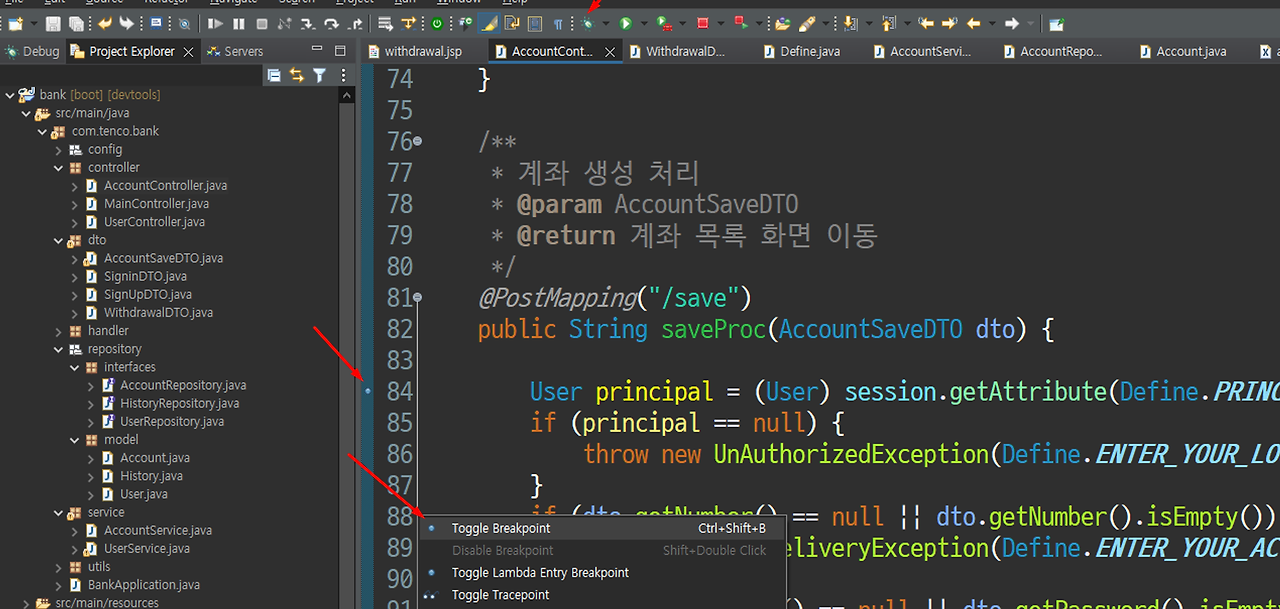
오른쪽 마우스를 클릭하고 원하는 곳(검증하는 곳)에서 브레이크 포인트를 선택한다.

프로그램을 동작 시켜 보자
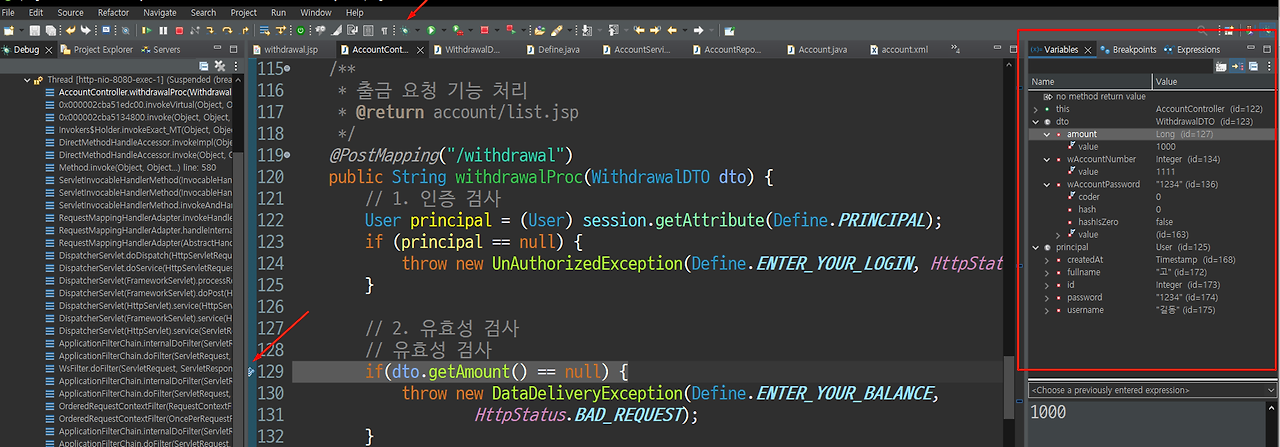
브레이크 포인트에서 실행에 흐름이 멈추는 것을 확인하고 오른쪽에 넘겨 받은 값이 정확한지 디버그 모드에서 확인할 수 있다.
'Spring boot' 카테고리의 다른 글
| Bank App 만들기 - 이체 기능 (0) | 2024.08.13 |
|---|---|
| Bank App 만들기 - 입금 기능 (0) | 2024.08.13 |
| Bank App 만들기 - 중간 리팩토링 (0) | 2024.08.13 |
| Bank App 만들기 - 계좌 목록 만들기 (0) | 2024.08.13 |
| Bank App 만들기 - 계좌 생성(유효성, 인증검사 중 무엇이 우선인가) (0) | 2024.08.13 |